Public Course Schedule
The online course schedule is available for anyone to search for classes for registration. The schedule gives you the ability to use a variety of search features and filters to look for courses. After selecting the semester you are interested in, you may search by course prefix, course number, course attribute, course status, and course title.
Learn how to use the online public course schedule by reviewing our help guide.
Course Schedule
Registration Calendar and Time Tickets
Students are encouraged to visit our registration calendar to see when registration begins.
- Undergraduate students shall meet with an advisor to plan their schedule and obtain a PIN for registration.
- Graduate students do not require a PIN to register.
- Once time tickets are made active you will be able to see your registration time frame in myRedDragon under the Registrar's Channel, Online Registration.
- Undergraduate students are assigned time tickets based on earned credit hours.
- Any "holds" on your record must be resolved before registration.
- Registration guidance, FAQs and information is also published by Advisement and Transition.
Visiting and Cross-Registering Students
If you are a visiting student (non-matriculated student) attempting to register, please access our visiting student page for policies and registration instructions. You may also review our cross-registration instructions if you are planning to attend using the SUNY cross-registration agreement. Please do not hesitate to contact the Registrar's Office if you have any questions about visitor registration or cross-registration.
Course Auditing
Please review the Course Auditing Procedures page for auditing information and forms.
Online Registration Tutorial
Connected Courses (Lectures and Labs/Recitations)
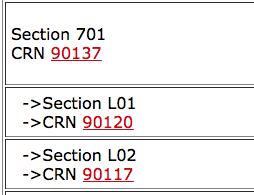 Many courses will have multiple elements associated with them. For example, many of the science courses offered at Cortland have a lecture and a lab component. When viewing the public schedule, the lecture will appear at the top of the list, with the labs appearing below and indented.
This indicates that these courses are linked, and you must register for the lecture, and the lab (or one of multiple lab options).
Location and Building Codes
Learn what the campus location and building codes mean by using our online guide.
Location Code Chart