The JP Morgan Chase Corporate VISA Procurement Card offers SUNY campuses an alternative procurement method when making small dollar purchases.
- The program is intended to afford SUNY campuses the opportunity to streamline their local procedures and controls for procuring goods and services. The Procurement Card is accepted by all vendors that accept VISA.
- Proper use of the procurement card can reduce the time between requesting, ordering, and actual receipt of goods and/or services. Savings derived from the use of the Procurement Card include: staff processing time, paper costs, postage, and quicker receipt of ordered merchandise.
- Procurement Cards must be used for “official” SUNY purchases only. Use of the card for personal items, cash advances, and business travel is prohibited. New York State is only liable for authorized charges made using the Procurement Card. Cards should be stored in a secure, but accessible, location when not in use.
- The cardholder is issued a single card embossed with his or her name and SUNY Cortland. Cardholders must return the Procurement Card to the Campus Program Administrator immediately upon request or upon termination of employment.
- Individuals will be authorized to use the Procurement Card only after attending a training session on proper use and procedures of the card. A second training session will occur the month after charges first appear on the card. This second training consists of how to change account numbers, etc. and to certify that the transactions are accurate for payment. Supervisory approval (signature) is required on all monthly documentation and supervisor training is available upon request.
Annual NYS Procurement Card Guidelines Review
Mandatory response due by April 30
Use of a New York State Procurement Card is subject to the following terms and conditions:
- Cardholder Responsibility
-
You have been entrusted with a valuable tool – the NYS JP Morgan Procurement Card. By using this card, you are making financial commitments on behalf of the State. Cardholders must strive to obtain the best value for the State and follow established purchasing policies as appropriate. Before making any purchase, the cardholder must verify that sufficient departmental funds are available.
-
- Authorized Use Only
-
The Procurement Card may only be used for authorized State business transactions. It may not be used for personal purchases or travel-related expenses (including restaurants). Cardholders may be personally responsible for reimbursing the State for any improper or unauthorized purchases including charges for sales tax, alcohol, or restaurant expenses.
-
- Restricted Purchases
- The Procurement Card should not be used to purchase apparel or furniture.
-
- Apparel purchase must be processed through a Purchase Order in Red Dragon Depot (RDD).
- Furniture purchases must be coordinated through Facilities Management. Please refer to the Furniture Policy for additional details.
-
- The Procurement Card should not be used to purchase apparel or furniture.
- Audits and Compliance
-
The University and the Office of the State Comptroller (OSC) may audit Procurement Card transactions. Appropriate action will be taken for discrepancies or unauthorized charges. Any evidence of fraudulent use will result in an investigation and may lead to disciplinary action, including possible criminal prosecution.
-
- Sales Tax Exemption
-
The University is tax-exempt and vendors should not charge sales tax. If sales tax is charged, the cardholder must contact the vendor to have the charge reversed and credited back to the Procurement Card.
-
If you are working to have tax removed when submitting your packet, note this in the comments section of the Procurement Log to inform the P-Card Administrator.
-
- Charge Discrepancies
- If there are discrepancies between the charged amount and the invoice amount, the cardholder must contact the vendor directly to resolve the issue or request a refund (for example, when receipts and invoices differ or sales tax is incorrectly applied).
- Required Documentation
-
Cardholders must submit documentation for all transactions, including itemized receipts, packing slips, and any other supporting documentation with invoices. Freight or shipping invoices are required for shipping charges exceeding $500. These invoices must be requested from the vendor at the time of purchase and included with your receipts.
-
- Shipping Requirements
-
When placing orders. Cardholders must instruct vendors to ship items to:
-
SUNY Cortland
3739 Stratton Dr.
Cortland, NY 13045
or another valid campus address.-
Items may not be shipped to non-campus addresses (i.e., home addresses).
-
-
- Procurement Log and Monthly Reconciliation
-
Cardholders must maintain a written or electronic Procurement Log (P-Card Log). You are responsible for retaining documentation for all purchases and returns and reconciling them electronically to the JP Morgan monthly billing statement. Monthly transactions must be certified, and your Procurement Log and P-Card packet must be completed by the due dates provided by the P-Card Administrator. Campus-wide certification and account reconciliation cannot be completed until all cardholder accounts have been certified.
Reminder: Both the Procurement Log and the FMS certification page must be signed by the cardholder and their supervisor.
-
- Late Submissions/Missing Documentation
- Cardholders who are late in certifying transactions or late in submitting all required documentation may have their card suspended or reduced to $1.00 until all documentation is provided. Paperwork more than 60 days overdue will automatically result in cardholder suspension until all documentation is received.
- Policy Compliance
- All policies and procedures established by New York State and SUNY Cortland regarding Procurement Card use must be followed. Failure to comply may result in revocation of card privileges or other disciplinary action, including possible termination of employment.
- Card Ownership
- NYS JP Morgan Procurement Cards remain the property of New York State. The card must be returned immediately upon request, employment termination, retirement, or department transfer. The P-Card Administrator must be notified promptly of any employment changes affecting cardholders.
- Cardholder Manual
- Cardholders and their supervisors are responsible for following all rules outlined in the Purchasing Card Program – Cardholder Manual, available on the Purchasing website.
- Lost or Stolen Cards
- If your Procurement card is lost, stolen, or compromised, you must immediately report it to JP Morgan at 1-800-316-6056 and notify the P-Card Administrator.
Important Notice
To ensure compliance and accountability, signed certifications from both the cardholder and their supervisor must be received by April 30. Failure to submit certifications by this date will result in the cardholder’s account being suspended until the documentation is received.
P-Card Administrator Contact Information
-
- Danielle Lewis
- [email protected]
- Extension 2407
- Additional Purchasing & Accounts Payable Office contacts are available on the Purchasing & Accounts Payable Staff page on the website.
Disclaimer
SUNY Cortland reserves the right to modify or update Procurement Card policies, procedures, and guidelines at any time at its discretion. Cardholders are responsible for adhering to the most current policies in effect.
Upon review of these guidelines, cardholders and their supervisors are required to submit their annual acknowledgement confirming that they have reviewed and agree to these guidelines.
Annual New York State Procurement Card Guideline Review Acknowledgement
Important: Do not click or submit again if you are only reviewing and signing an existing acknowledgement.
Cardholder Manual
Program Overview
P-Card Administrator: Danielle Lewis, ext. 2407
SUNY Cortland’s Procurement Card (P-Card) Program provides a more efficient and cost-effective method for procuring and paying for small-dollar purchases from vendors that accept Visa. The program allows cardholders to purchase approved commodities and services directly from vendors.
Each P-Card is issued to a named individual, who is accountable for all transactions made with the card.
Cardholders must return the P-Card to the Campus P-Card Administrator immediately upon request or upon termination of employment.
Cardholders are not billed directly for the charges; however, they are responsible for recording purchases, accessing and printing monthly statements of account activity from the J.P. Morgan Chase website, and reconciling transactions in the online reconciliation system.
New York State is liable for all authorized charges made using the P-Card.
Note: Travel-related expenses, including meals, lodging, airfare, and car rentals, are not permitted on the J.P. Morgan Chase Visa P-Card.
Who Receives a P-Card?
The department or office Administrative Assistant will typically serve as the primary cardholder. Up to two (2) additional cards may be requested and must be approved by the Associate Director of Purchasing and Accounts Payable. Any exceptions require approval from the Vice President for Finance and Management.
It is important that each individual receiving a P-card is familiar with New York State procurement procedures and SUNY Cortland purchasing policies, which are available on the SUNY Cortland Purchasing website
Each cardholder is responsible for verifying all charges associated with their department or office’s specific state account number. Only authorized purchases are permitted.
Employees who makes unauthorized purchases are subject to appropriate disciplinary action (see Unauthorized Purchases).
Application Process
To obtain a P-Card, complete and submit an Application for the NYS J.P. Morgan Chase Visa Procurement Card. Once your application is received and approved, the Procurement Card Administrator will email instructions for configuring your web access to the P-card online system.
Note: All applicants must complete this web access configuration for their application to be transmitted to J.P. Morgan Chase.
P-cards typically take approximately two (2) weeks to arrive after approval.
The Office of the State Comptroller (OSC) requires all cardholders to attend a training session with the P-Card Administrator prior to receiving their card. Once the card arrives from J.P. Morgan Chase, the P-Card Administrator will contact the employee to schedule training and card pickup.
General Rules Regarding P-Card Usage
All rules and procedures of Purchasing apply to any transactions placed on the P-card. Cardholders must adhere to the following guidelines:
- Use Preferred Source Vendors
These include:- NYS Department of Corrections (Corcraft)
- NYS Industries for the Disabled (NYSID)
- NYS Preferred Source Program for People Who Are Blind (NYSPSP)
More information on the preferred source offerings can be found on our website.
- Use State Contract Vendors whenever possible: OGS Centralized Contracts List.
- Use Certified Women-Owned or Minority-Owned Vendors whenever possible.
- Obtain competitive price quotes and include a Reasonableness of Price Checklist (ROPC) for any purchase $2,500 or more.
- Keep accurate records and documentation for all transactions, including verifying that funding is available and obtaining supervisor approval.
- Guard your P-Card information carefully. If you would not make a purchase with your personal credit card, you should not make it with the P-Card.
- Upon termination of employment, cardholders must notify the P-Card Administrator and return the P-Card along with any outstanding receipts and supporting documentation for remaining purchases.
- When transferring to a new position on campus, cardholders must notify the P-Card Administrator. If the P-card will not be required in the new position, it must be returned. Otherwise, submit a new P-Card application signed by the new supervisor.
Roles and Responsibilities
Cardholder
- Accountability
- The cardholder is responsible and accountable for all P-Card transactions.
- Appropriate Use
- P-Cards are only for official SUNY purchases.
- Cardholders must provide the business purpose for each purchase.
- Prohibited uses:
- Personal items
- Cash advances
- Business travel expenses.
- For clarification, contact the P-Card Administrator before to making the purchase.
- Tax Exemption
- SUNY is tax-exempt.
- If sales tax is charged, the cardholder must contact the vendor to correct the charge.
- Procurement Log & Documentation
- Maintain a written Procurement Log
- Retain all receipts, purchases, and returns documentation.
- Reconcile transactions electronically with the monthly J.P. Morgan Chase statement.
- Certify monthly transactions and submit your log and P-card packet by the emailed due dates
- Chronic late submission may result in card suspension.
- Compliance
- Follow all SUNY and New York State policies and procedures.
- Non-compliance can lead to revocation of card privileges or disciplinary action, up to termination.
- Security
- Do not share your P-Card or account number with anyone, except the vendor.
- Do not allow anyone else in your department or office to use your P-Card.
- Assistance
- Questions about proper use should be directed to the P-Card Administrator at ext. 2407.
Per the SUNY Office of Internal Audit: “The Office of the University Auditor and the New York State Comptroller (OSC) use a number of forensic accounting tools to detect potentially fraudulent, wasteful, and abusive expenditure activity as well as other inappropriate uses of State resources. We ask that all cardholders adhere to these policies and report suspicious or unusual activity to the appropriate authorities.”
Supervisor
It is the responsibility of the cardholder’s supervisor to review the JP Morgan Chase monthly billing statement and supporting documentation submitted by the cardholder to ensure that all purchases are for valid State business purposes.
The supervisor signs and dates the Procurement Log to indicate approval for the purchases.
- If there are discrepancies or disagreements, the supervisor must meet with the cardholder to obtain an explanation and have the problem resolved.
Within five (5) days of receiving the certified SUNY statement, the JP Morgan Chase monthly billing statement, and accompanying documentation from the cardholder, the supervisor must complete the departmental manager certification via the SUNY Financial Management System (FMS), sign and date the Procurement Log supplied by the cardholder, and forward everything (including all attachments) back to the cardholder to digitally submit to the P-Card Administrator via the Dropbox.
P-Card Administrator
The Program Administrator is the liaison between the University, JP Morgan Chase, and SUNY.
Upon P-Card application submission, the Program Administrator will setup all cardholders within JP Morgan Chase & SUNY FMS and provide training for all campus employees authorized to use the P-Card.
The administrator will audit and retain monthly certification documents and scan and index documents within OnBase for retention.
Both the Procurement Card Administrator (Danielle Lewis) and the Associate Director of Purchasing and Accounts Payable (Casey Avery) are available for assistance regarding the Procurement Card Program at ext. 2407 and ext. 2307 (respectively).
Unauthorized Purchases
The following purchases are not permitted on the SUNY Cortland P-Card:
- Travel and entertainment – e.g., airline tickets, car rentals, taxis, shuttles, parking, lodging, restaurant dining, meals, etc.
- Apparel – must be purchased through a Purchase Order (PO) in Red Dragon Depot (RDD).
- Furniture – see the SUNY Cortland Furniture Policy for guidance.
- Flowers, greeting cards, and personal celebrations – e.g., birthdays, retirements, staff morale, and recognition items.
- Gift certificates or gift cards – unless pre-approved via the Cortland Auxiliary Services (CAS) Gift Card/Certificate Request Form.
- Store-value cards
- Breakroom supplies – e.g., cutlery, paper products, etc.
- Personal items – e.g., over-the-counter medication, tissues, air fresheners, etc.
- Reimbursable and personal expenses – e.g., gasoline, meals, etc.
- Alcoholic beverages and coffee service
- Food purchases, refreshments, or meals – except for exceptions such as ASC events that are on-campus learning events or candidate lunches. Documentation of the event is required, including:
- Event announcement
- Agenda
- Attendee list
- Business purpose or program description
- Copies of any advertising or promotional materials
- Orders exceeding transaction limits – request a limit increase if necessary. Submit an email to the Procurement Card Administrator (cc: Associate Director of Purchasing & Accounts Payable) including:
- Supervisor’s approval email
- Reasonableness of Price Checklist (ROPC)
- Invoice
- Split ordering – two or more partial payments for the same vendor are prohibited.
- Leases or insurance
- Contracted services from an individual
All purchases must be for official state use and must be reasonable, rational, and cost-effective. Purchases must relate to the program’s purpose, reflecting responsible stewardship of public funds.
Information Technology Purchases
All IT-related purchases, including technology hardware, software, and any cloud or externally hosted systems, software and services, require review and approval of the Office of the Associate Vice President and Chief Information Officer or their designee.
As a general rule, Information Resources (IR) will place IT purchases on behalf of the university. This ensures compatibility with existing campus systems and adherence to established standards.
- For more information, see the Information Technology Purchasing Policy.
- Guidelines regarding Subscriptions, Renewals, & IT Purchases.
Equipment Purchases (Non-Technology)
Durable equipment with a value over $5,000 must be tagged and recorded in the State’s Property Control System. Whenever possible, these items should be purchased through the Purchasing & Accounts Payable Office using a Purchase Order (PO).
Questions about equipment should be directed to Chris Tucker, Director of Property Control and Print Services. Call ext. 2488 immediately upon receipt of equipment not ordered through the Purchasing & Accounts Payable Office (via RDD) to ensure it is properly recorded into the Property Control System and tagged.
Shipping Address & Freight/Shipping Over $500
Freight or shipping invoices are required for any shipment over $500. These invoices must be requested from the vendor at the time of purchase and submitted along with your paid receipts.
All shipments must be delivered to a valid campus address, preferably Central Receiving (3739 Stratton Drive, Cortland; attention to and department name).
Credit Card Fees
Cardholders should not incur credit card fees exceeding 5% of the purchase amount or $100 per transaction, whichever is lower.
If a fee falls within this limit, the department or office may determine, at its discretion, whether to pay the fee from its budget. Any fee exceeding this threshold is not permitted unless explicitly approved in advance.
Tax-Exempt
The University is tax-exempt.
If sales tax appears on the invoice, the cardholder is responsible for contacting the vendor to have the sales tax charge credited back to their P-Card. You are required to pursue a vendor credit if there is a sales tax charge.
SUNY Cortland Tax Exempt #: 14740026K
SUNY Cortland Federal ID #: 146013200
Reasonableness of Price & Responsible Vendors
Cardholders should verify that prices paid are reasonable. This can be done by comparing costs from other sources or historical costs.
“Reasonable” means a “fair market price” based on normal competitive conditions and not necessarily the lowest possible price.
Reasonableness of Price Checklist (ROPC) (PDF)
Responsible Vendors:OSC encourages agency awareness and consideration of vendor responsibility in all purchases and procurements. Cardholders should select reputable vendors to make purchases from.
Misuse or Abuse of the P-Card
The term “misuse or abuse” refers to using the P-Card outside of authorized parameters, including, but not limited to:
- Using the card in a manner that violates established P-Card Program, State, SUNY, or University guidelines.
- Using the card for prohibited purchases (e.g., personal expenses, travel-related expenses).
- Splitting orders to remain within the transaction limit.
- Sharing your P-Card with anyone else.
In all cases, the cardholder must reimburse the university for any unauthorized purchases.
The general disciplinary procedures are outlined below. Based on the severity of an offense, the university reserves the right to advance the disciplinary process to the appropriate stage and require retraining of the cardholder as necessary.
1st Offense:
- The cardholder will be notified of the infraction and advised to use the P-Card only for official purposes, in accordance with NYS and J.P. Morgan Chase guidelines.
- The cardholder will be informed that further violations may result in suspension of P-Card privileges.
- The cardholder is personally responsible for reimbursing the state for any unauthorized purchases.
2nd Offense:
- All P-Card privileges will be suspended for one (1) month.
- The cardholder’s supervisor and the Associate Director of Purchasing & Accounts Payable will be notified of the violation and suspension.
- At the end of the suspension, the cardholder’s supervisor may elect to reinstate privileges with approval from the P-Card Administrator.
- The cardholder remains personally responsible for reimbursing the state for any unauthorized purchases.
3rd Offense:
- Use of the P-Card will be permanently suspended.
- The cardholder is personally responsible for reimbursing the state for any unauthorized purchases.
Note: Departments and offices may implement additional disciplinary actions as deemed necessary.
Monthly Certification Process
Cardholders are notified by J.P. Morgan Chase via email when a new statement is available and ready to print. Do not certify your P-Card until you receive an email from the P-Card Administrator instructing you to do so and indicating the deadline for completion.
First-time certifiers will attend a second training session with the P-Card Administrator on the certification process when their first statement becomes available. Detailed instructions for certifying and printing your statement can be below under Certifying Your P-Card Instructions.
Cardholders who fail to certify or submit their packet by the deadline without notifying the P-Card Administrator will have their P-Card suspended until the certification and P-Card packet, including all original signatures, are submitted and reviewed.
Once certification and the P-Card packet have been received and audited by the P-Card Administrator, the card will be reinstated.
Note: Multiple infractions may result in revocation of P-Card privileges.
Digital P-Card Packet Submission
Preparing a Digital P-Card Packet
- Ensure files are legible and clear for auditing purposes.
- Confirm all documents are oriented correctly (right-side up).
- Scan both sides of any two-sided documents and remove blank pages.
- Log and certification sheets must have original signatures (see Signature Types for further guidance) before scanning.
- Save files using the following naming convention:
[year (YYYY).packet month (MM) – Last name.First name]- Example: August 2024 packet for Casey Avery →
2024.08 – Avery.Casey
- Example: August 2024 packet for Casey Avery →
Additional Information:
Dropbox Instructions
PC
- Map P-Card Dropbox to your computer
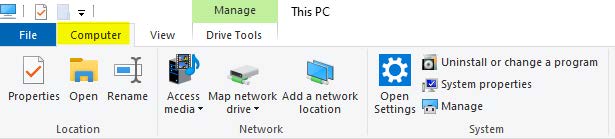
- Mapping instructions: File Explorer / This PC (left navigation list) / Computer tab
- Click Map Network Drive
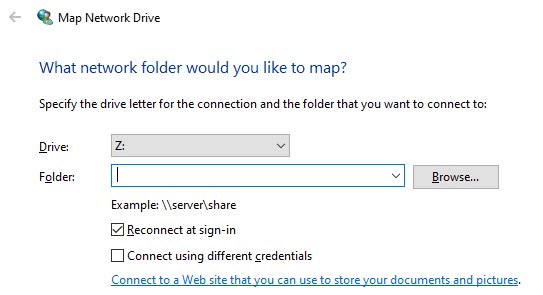
- Choose any drive available from list
- Folder – type: \\shares\p-card
- Click Finish
- Click Map Network Drive
- Mapping instructions: File Explorer / This PC (left navigation list) / Computer tab
- Once mapped, create a shortcut to your desktop for easy access.
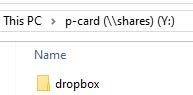
- IMPORTANT: You will NOT be able to open this folder.

- IMPORTANT: You will NOT be able to open this folder.
- Saving your Digital Packet
- Scan and email the packet to yourself (this creates a PDF file)
- Save file using the following format:
Statement Month (3-letter abbreviation).Year (YY)-Full Name (as on statement)-[Bank]JPMC-Statement Total- Example: December 2025 packet for Jane Doe for $625.72
File Name: Dec.25-Jane Doe-JPMC-625.72
- Example: December 2025 packet for Jane Doe for $625.72
- Drag & drop PDF packet file into “dropbox” folder (again, you will not be able to click and open this folder or remove anything once submitted).
Important Retention Note: The Purchasing & Accounts Payable Office maintains the official records electronically, so you may dispose of your purchase documents whenever you feel comfortable. If you prefer to keep them for a few months for quick reference, that’s perfectly fine; however, please note that all POs (along with any related attached documents) and p-card packets are filed in OnBase.
Mac
- Click on the desktop or a finder window.
- Press the command key (⌘) and “k" simultaneously, or select "Go" in the menu bar
- Select "Connect to server"
- Type smb://shares/p-card into the empty field and select Connect
- In the “Connect to server" window, press '+' (lower left), this will make the path a Favorite.
- Once connected to the folder, click on "p-card" (top of finder window) and drag the icon over to your sidebar or down onto your dock (next to the trash) for even quicker access.
- Saving Your Digital Packet
- Scan and email the packet to yourself (this creates a PDF file)
- Save file using the following format:
- Statement Month (3-letter abbreviation).Year (YY)-Full Name (as on statement)-[Bank]JPMC-Statement Total
Example: December 2025 packet for Jane Doe for $625.72
File Name: Dec.25-Jane Doe-JPMC-625.72
- Statement Month (3-letter abbreviation).Year (YY)-Full Name (as on statement)-[Bank]JPMC-Statement Total
- Drag & drop PDF packet file into “dropbox” folder (again, you will not be able to click and open this folder or remove anything once submitted).
Important Retention Note: The Purchasing & Accounts Payable Office maintains the official records electronically, so you may dispose of your purchase documents whenever you feel comfortable. If you prefer to keep them for a few months for quick reference, that’s perfectly fine; however, please note that all POs (along with any related attached documents) and p-card packets are filed in OnBase.
Certifying Your P-Card Instructions
You will receive an email from JP Morgan when your statement is available. Do not complete SUNY certification until you receive an email from the P-Card Administrator notifying you to do so.
Step 1: Print your JP Morgan Statement
-
- Go to: paymentnet.jpmorgan.com.
- Click Statements on the PaymentNet menu.
- If you have more than one (1) account, use the For-Account dropdown to view the statement for another account.
- To view the statement for a different billing cycle, select the appropriate date from the Billing Date dropdown.
- Click View Statement (PDF)
- When prompted, choose whether to open the statement in a new browser tab or save a copy.
- Use Adobe PDF Viewer to print the statement.
Note: You can also view and download statements directly from the Cardholder Dashboard. Go to Statements, click View to open a statement, click Download (PDF) to save a copy.
Step 2: Certify Purchases in the SUNY Financial Management System (FMS)
- Go to the Cortland website and click on myRedDragon.
- Click Faculty/Staff.
- Select SUNY Portal Logon on the right side of the page.
- Within Business Systems Applications, click Finance & Management System.
- Click the Finance tab.
- Select Cardholder Statement.
Review and Verify Purchases
-
- Using the Statement Cycle dropdown to select the correct statement cycle.
- Under Statement Detail, review your purchases and verify the account number(s) being charged.
To Change an Account Number
-
- Click Edit next to the charge.
- Under Funding Information, click Edit Funding.
- Delete the current account number.
- Enter the new account number.
- Available accounts will populate in the dropdown
- Select the correct account
- Click Save & Return.
To Split Code a Transaction
-
- Change the amount to be charged to the account displayed.
- Click Save/Add Next Account.
- Enter the additional account information
- Once all changes are completed, click Save on the Transaction Details page.
Certify the Statement
-
- Once all transaction changes are complete, click Certify.
- A disclaimer will appear. Review it.
- Click Certify again.
- On the Statement Detail page, click on Cert Print at the bottom of the page.
This is your Certification Page and must be included in your P-Card packet.
Required Documentation for your P-Card Packet
You must send the following documents to the P-Card Administrator and retain copies for your records:
- Procurement Log
- Must be completed, signed, and dated by the cardholder.
- Must also be signed by the supervisor.
- The supervisor’s name and title must be printed under the signature
- Include the account number for each purchase
- JP Morgan Statement
- SUNY Certification page
- Must be signed by the cardholder and their supervisor.
- Supporting Documentation
- Include all supporting documentation for each transaction in the same order as listed on the JP Morgan statement, such as:
- Itemized invoices
- Packing slips
- Paid receipts
- Email confirmations
- Any other relevant documentation
- Include all supporting documentation for each transaction in the same order as listed on the JP Morgan statement, such as:
Freight/Shipping Documentation
-
- Freight or shipping charges over $500 require a freight invoice.
- These invoices must be requested from the vendor at the time of purchase.
- The freight invoice must be submitted with the paid receipt documentation.
- Freight or shipping charges over $500 require a freight invoice.
Important Notes:
⚠ Failure to submit proper documentation may result in temporary suspension of your procurement card.
⚠ Repeated failure to submit documentation may result in permanent suspension of your procurement card.
How-to Video - How to Change a Dept Account Number when Certifying your P-Card
Forms & Logs
Business Office Deactivation Form (When supervisors become aware that an employee is leaving the campus/department, or their access is no longer needed, the supervisor must promptly initiate the deactivation process.)
Information Technology Purchases
IT-related purchases (technology hardware; software; and any cloud or externally hosted systems, software as a service) need the review and approval of the Office of the Associate Vice President and Chief Information Officer or designee.
As a general rule, IT purchases will be placed by Information Resources on behalf of the University. This ensures compatibility with existing campus systems and standards.
Please see the Information Technology Purchasing Policy.
Guidelines regarding Subscriptions, Renewals, & IT Purchases.