
Highlights
- Accessibility is a design question, not an individual accommodation.
- Accessible design changes the delivery, not the rigor. You flex the “how” and hold the standard steady.
- Small, proactive moves such as captions, structure, and multiple formats benefit every learner.
Most of us picked up our ideas about accessibility informally: from an accommodation letter, a colleague's offhand comment, or our own experiences as students. Some of those ideas hold up. Others quietly make our courses harder to access than we ever intended.
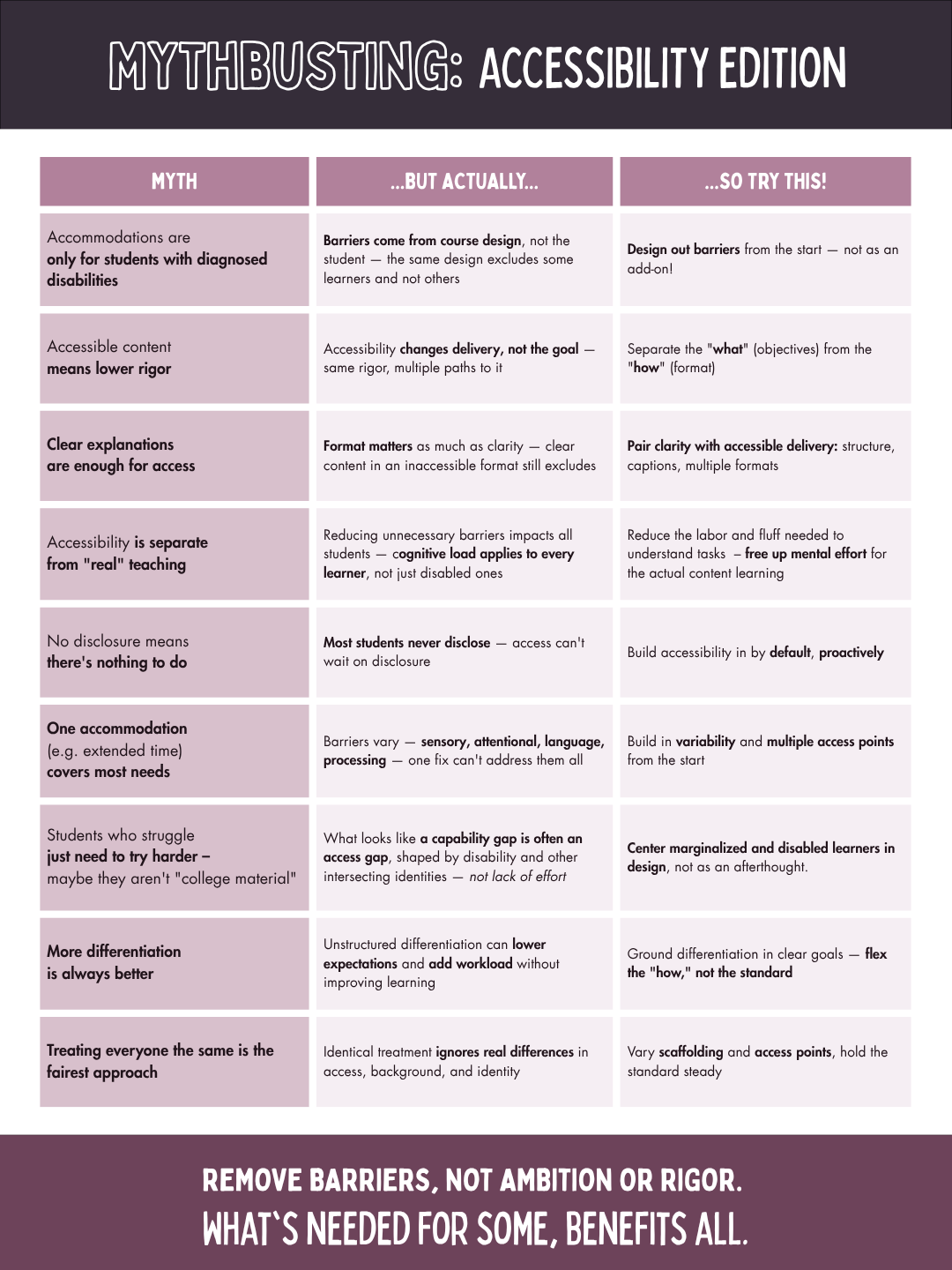
Below are nine common assumptions about accessibility. For each one, we look at what's actually going on and suggest one small design move to try. With new digital accessibility requirements under Title II of the Americans with Disabilities Act (ADA) arriving in April 2027 (U.S. Department of Justice, 2024), accessibility is on a lot of minds right now. The case here, though, is about good teaching, not compliance. What's needed for some benefits all.
.png?language_id=1)
Who is accessibility for?
The first set of myths treats accessibility as something that happens to individual students, after the fact. In practice, accessibility works best when we treat it as a question of course design.
"Accommodations are only for students with diagnosed disabilities"
But actually: Barriers come from course design, not the student (CAST, 2024). The same design can work smoothly for one learner and exclude another. Common examples include a video without captions, a PDF that a screen reader can't parse, and a deadline structure that assumes uninterrupted time.
So try this: Design out barriers from the start, not as an add-on. When you build or revise a module, ask "Who might get stuck here, and why?" before anyone has to tell you.
"No disclosure means there's nothing to do"
But actually: Most students never disclose. National data suggests that only about a third of college students with disabilities inform their institution (National Center for Education Statistics [NCES], 2022). Part of the reason is that the process changes after high school. In K–12, schools identify students who need support, but in college, students have to seek it out themselves, and many don't know how (SUNY, n.d.). SUNY explains this shift in its guide to moving from high school to college for students with disabilities. Some students may also have conditions that are undiagnosed, temporary (a concussion, say, or a broken wrist), or not something they think of as a disability. Access can't wait on disclosure.
So try this: Build accessibility in by default, proactively. Caption your videos, use real headings in your documents, and post materials in formats that students can resize, listen to, or download. If a student does want formal accommodations, you can point them to Disability Resources' guide to getting started.
"Students who struggle just need to try harder"
This myth sometimes comes with a follow-up: "Maybe they just aren't college material."
But actually: What looks like a capability gap is often an access gap, shaped by disability and other intersecting identities (Baglieri et al., 2011). It is not a lack of effort. A student who is working a night shift, learning in English as an additional language, or managing ADHD may be putting in more effort than anyone else in the room, against far more friction.
So try this: Center marginalized and disabled learners in design, not as an afterthought. When something isn't working for a student, look first at what in the course might be in the way. For support with study habits, time management, and planning, you can also connect students with Cortland's learning strategist.
Does accessibility mean lowering the bar?
We hear this worry often, and it's a fair one to raise, because none of us want to water down what our students are capable of. The short answer is no, as long as we're clear about what we're actually asking students to learn.
"Accessible content means lower rigor"
But actually: Accessibility changes the delivery, not the goal (CAST, 2024). The rigor stays the same, but there are multiple paths to reach it. A student who listens to a reading instead of seeing it still has to understand and analyze it.
So try this: Separate the "what" (your learning objectives) from the "how" (the format). Then ask which parts of the "how" are essential to the objective and which ones are just habit. If the objective is to construct an argument, does it need to be a written essay, or could it be a recorded presentation? If the objective is the writing itself, keep the essay and look for flexibility elsewhere. For an example of what this looks like in a first-year course, see Kumar and Wideman (2014).
"More differentiation is always better"
But actually: Differentiation without clear goals can multiply the work, for you and for your students, without making learning any more accessible. UDL starts from firm goals and builds flexibility around them (CAST, 2024). Five versions of an assignment isn't the goal.
So try this: Ground differentiation in clear goals. Flex the "how," not the standard. One well-designed assignment with two or three format options and a shared rubric often works better than an open-ended menu.
"Treating everyone the same is the fairest approach"
But actually: Identical treatment ignores real differences in access, background, and identity (Baglieri et al., 2011). When students start from different places, the same inputs don't produce the same opportunities.
So try this: Vary the scaffolding and access points, and hold the standard steady. Every student works toward the same learning objectives, but not every student needs the same route to get there.
What does accessible teaching actually involve?
Once we understand accessibility as a design question, the next question is a practical one: what does it look like in an actual course?
"Clear explanations are enough for access"
But actually: Format matters as much as clarity. Clear content in an inaccessible format still excludes (CAST, 2024; SUNY Online, n.d.). A beautifully explained lecture video without captions can't be accessed by every student. Neither can a scanned PDF, which is essentially a picture of text.
So try this: Pair clarity with accessible delivery, including structure, captions, and multiple formats. Use built-in heading styles in your documents, and add captions to your videos in YuJa. Auto-captions are a great start, but give them a quick review for accuracy. You can also use YuJa Panorama to flag common accessibility issues in your Brightspace course files. For course readings, Disability Resources has a guide on providing accessible readings.
"Accessibility is separate from 'real' teaching"
But actually: Reducing unnecessary barriers affects all students, because cognitive load applies to every learner, not just disabled ones (Sweller, 1988). Every minute a student spends decoding a confusing navigation structure or hunting for a due date is a minute they don't spend on the content.
So try this: Reduce the labor and fluff students need to get through just to understand a task. That frees up mental effort for learning the actual content. Consistent module layouts, clear instructions in one place, and predictable due dates all count as accessibility work, and they're also just good teaching.
"One accommodation (e.g., extended time) covers most needs"
But actually: Barriers vary. They can be sensory, attentional, linguistic, or related to processing, and no single fix can address them all (CAST, 2024). Extended time won't help a student who can't hear the audio, or a student whose screen reader can't parse the exam. When exam accommodations are needed, the faculty guide to test administration walks through how the process works.
So try this: Build in variability and multiple access points from the start. Offer content in more than one format, such as text plus video or slides plus notes. Give students more than one way to engage with material and demonstrate what they've learned. This is the core idea behind Universal Design for Learning (UDL; CAST, 2024). For an introduction, see Disability Resources' overview of UDL.
Where to start
Accessible design removes barriers, not ambition or rigor. What's needed for some benefits all.
You don't need to overhaul an entire course to get started. Pick just one of these to begin with:
- Review one module against the accessibility standards in the OSCQR rubric.
- Caption one video, or check the auto-captions on one you've already posted.
- Rewrite one assignment prompt so that the objective, steps, and due date are easy to find.
Want a second set of eyes? The CTL's instructional designers are always happy to talk through your course. Request a consultation, or explore more on our digital accessibility resource page.
Citations & Further Reading
References and further reading
- Baglieri, S., & Bacon, J. (2020). Disability studies in education and inclusive education. In Oxford Research Encyclopedia of Education. https://doi.org/10.1093/acrefore/9780190264093.013.1245
- Baglieri, S., Bejoian, L. M., Broderick, A. A., Connor, D. J., & Valle, J. (2011). [Re]claiming “inclusive education” toward cohesion in educational reform: Disability studies unravels the myth of the normal child. Teachers College Record, 113(10), 2122–2154. https://doi.org/10.1177/016146811111301001 Cortland Access
- Building an anti-ableist pedagogy. (n.d.). ASCD.
- CAST. (2024). Universal Design for Learning Guidelines (Version 3.0).
- Hughes, O. (2023, June 12). Pedagogies of lived experience: The perspectives of people with disabilities on their educational presentations about disability topics. Disability Studies Quarterly, 42(3–4). https://doi.org/10.18061/dsq.v42i3-4.8120 Open Access
- Kumar, K. L., & Wideman, M. (2014). Accessible by design: Applying UDL principles in a first year undergraduate course. Canadian Journal of Higher Education, 44(1), 125–147. Open Access
- Murray, J. (2022, November 16). Resources for practicing anti-ableist pedagogy. Transformative Learning in the Humanities, CUNY.
- National Center for Education Statistics. (2022). A majority of college students with disabilities do not inform school, potentially limiting their access to improve learning. NCES Blog.
- SUNY Online. OSCQR: SUNY Online Course Quality Review Rubric.
- Sweller, J. (1988). Cognitive load during problem solving: Effects on learning. Cognitive Science, 12(2), 257–285. https://doi.org/10.1207/s15516709cog1202_4
- Understanding disabilities and tips for inclusive pedagogy. (n.d.). Student Disability Center, Colorado State University.
At Cortland and SUNY
- Disability Resources: Faculty resources
- Disability Resources: Universal Design for Learning
- Disability Resources: Providing accessible readings
- Disability Resources: Test administration for faculty
- Disability Resources: Learning strategist
- Disability Resources: Getting started (for students)
- Disability Pride at SUNY Cortland
- SUNY: Students with disabilities, from high school to college